Website redesign in Oakville, without losing what you have
A rebuild is the easiest way to destroy rankings you spent years earning. Done properly, it is also the fastest way to improve them.
30 minutes · Video call · No commitment
5.0 from Google reviews
… Communication was clear throughout the process, timelines were met, and the final result exceeded our expectations.






The problem
The single most common way a redesign goes wrong has nothing to do with how it looks. Old pages get deleted, the URLs change, and nobody maps redirects. Google keeps sending people to addresses that no longer exist, and every ranking those pages held drains away over the following months.
This is not hypothetical and it is not rare.
The second failure is more subtle. A site gets redesigned to look better, the structure is carried over unchanged, and six months later nothing has improved. The old site did not underperform because it was ugly. It underperformed because everything sat on one page and Google had nothing specific to rank.
A redesign that changes the appearance and keeps the architecture is an expensive way to stand still.
How a redesign is handled here
The visible part is the easy part.
Audit before anything
What currently ranks, what earns traffic, and what is quietly worth keeping. You cannot protect what you have not measured.
Redirect mapping
Every old URL mapped to its new home before launch, as 301s. This is the step that gets skipped and it is the one that costs the most.
Restructured, not restyled
Rebuilt around what people actually search for, with a page per service and per area, rather than the old structure in new clothes.
Content carried across
Pages that already earn traffic get preserved and improved rather than thrown out because they were on the old site.
Mobile-first rebuild
Most sites needing a redesign were never really designed for phones, which is typically a third to a half of the traffic. If you have 20 or more employees in Ontario, see what AODA requires of your website.
Launch without downtime
Built alongside the live site and switched over, rather than taking you offline while it is assembled.
Switching platforms
Can you move my site from Wix, Squarespace or Shopify?
Yes. We rebuild Wix and Squarespace sites on WordPress. For a Shopify store, book a free call and we will talk it through. Your text, images and blog posts come with you. Your old addresses are redirected, and your domain and email keep working.
Have you worked on Wix sites?
Yes. We built the Doggie Playland website on Wix for a dog daycare in Etobicoke, under our earlier name: Oakville Web Designs is now Oakville AI. It has pages for daycare, training and grooming, a gallery with their Instagram feed, and a contact page. Customers book daycare visits and temperament assessments online through Wix's booking system.
Which platform should my new site be on?
The one that suits how you run the business. We'll recommend one on the call:
- WordPress is our usual recommendation, and the platform we have the most experience with. The site is files and a database you can take to any host, and you control page structure, titles, schema and redirects.
- Wix or Squarespace are fine if you want to edit everything yourself in one dashboard and the site is mostly pages, a gallery and a contact form.
- WordPress with WooCommerce is usually the right home if selling products online is the main job of the site. If your store is staying on Shopify, start with a free call.
If your current site does its job and you have no reason to move it, staying put is a real option. We'll tell you that on the call rather than sell you a migration.
What carries over, and what gets rebuilt?
Carries over
- Page text
- Images
- Blog posts
- Your domain
- Your email
- Your page titles and descriptions
- Your old page addresses (through redirects)
Gets rebuilt
- The design and layout
- Forms
- Booking and store apps
- Anything made with the old platform's own widgets
Those only exist on that platform, so they're rebuilt on the new one.
How do you protect my Google rankings when switching platforms?
With the same redirect process as every redesign, plus a few platform-specific steps:
List every old address, including blog posts and pages Google has indexed that you may have forgotten. Each platform has its own patterns. Wix blog posts sit under /post/, for example, and Shopify puts products under /products/ and categories under /collections/.
Keep URLs the same where the new platform allows it, so most pages need no redirect at all.
301-redirect everything that has to change to its closest new page before launch. That means no blanket redirects to the homepage.
Carry titles, descriptions and schema across, or improve them.
After launch, submit the new sitemap in Google Search Console, then check the Pages and crawl reports for 404s and redirect errors over the following weeks.
Can I keep my domain and email?
Your domain: yes. You can transfer it away from Wix, Squarespace or Shopify to another registrar, or leave it where it is and point its DNS at the new host. Both work. Transferring means one less account with the old platform. Pointing is quicker.
Your email: if you use Google Workspace or Microsoft 365, your email lives there, not on your website. It depends on mail records in your domain's DNS. Before we change anything, we copy those records across, so mail keeps arriving during and after the switch. If your email was bought through the website platform itself, we'll work out the move with you before the switch.
How much does it cost to switch platforms?
Website builds start from $1,250, and a platform move is priced the same way: on how many pages and posts you have and how much has to be rebuilt. For a Shopify store, we confirm the exact scope on your free call. Start with a free call, and you get a written price. If you want the full picture, the Oakville AI Audit is $350, one-time, and credited if you start a monthly plan within 30 days of your report.
Care plan: From $75/month (3-month minimum, then month to month), for updates, backups and monitoring after launch, for any WordPress site, including ones we didn’t build (those start with a free health check). Our monthly plans are for WordPress sites or similarly flexible, code-based platforms. Wix and Squarespace sites can't join a plan, but we can rebuild them on WordPress.
Email hello@oakvilleai.comCall (905) 484-0899
Full redesign
From $1,250
Priced on page count and how much needs rebuilding rather than migrating.
Sometimes cheaper
Repair, not rebuild
If the site is structurally sound, fixing it costs less. We will say so if that is the case.
Sometimes neither
SEO instead
Occasionally the honest answer is that the site is fine and what you need is the pages and the profile work.
Websites you can go and look at
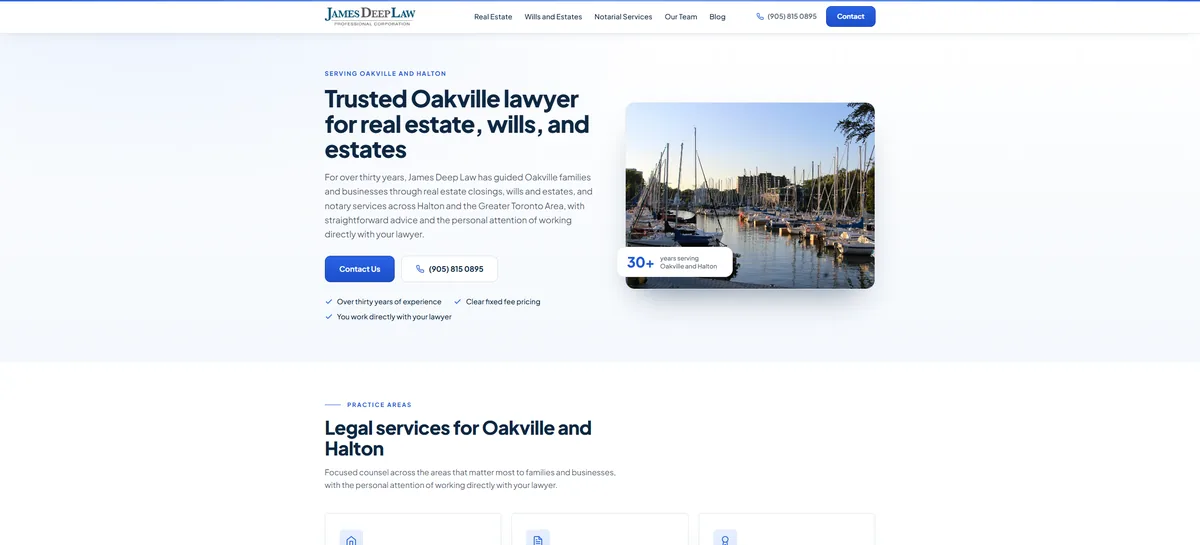
Law · Web + SEO
James Deep Law
A thirty-year Oakville firm on a template that failed on mobile.
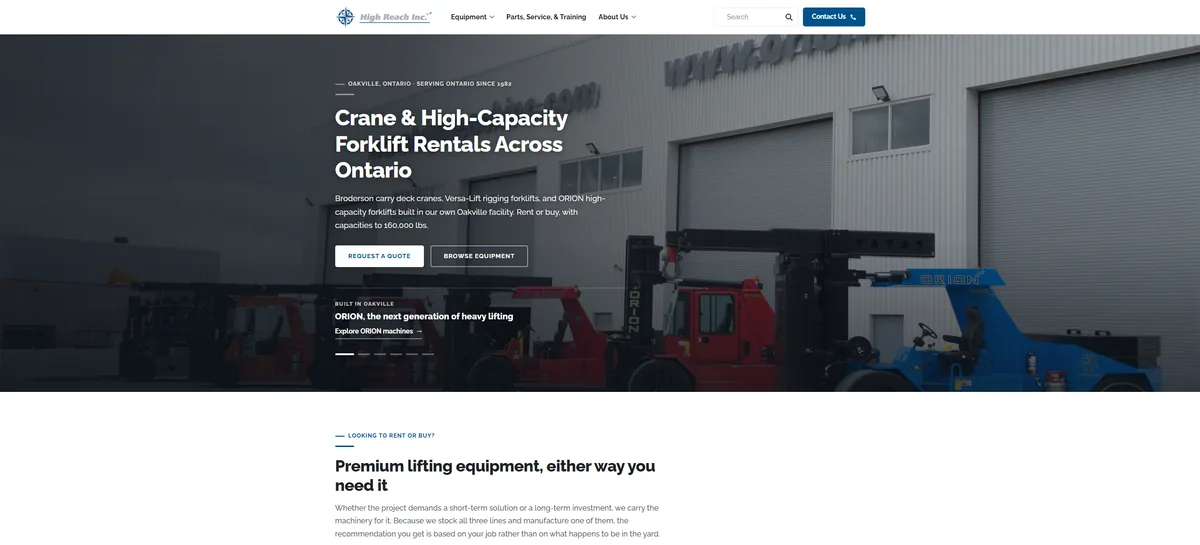
Industrial · Web + SEO
High Reach Inc.
Equipment rental and sales, rebuilt around how buyers search: by model number, not by category.
Disclosure: High Reach Inc. is a family connection.
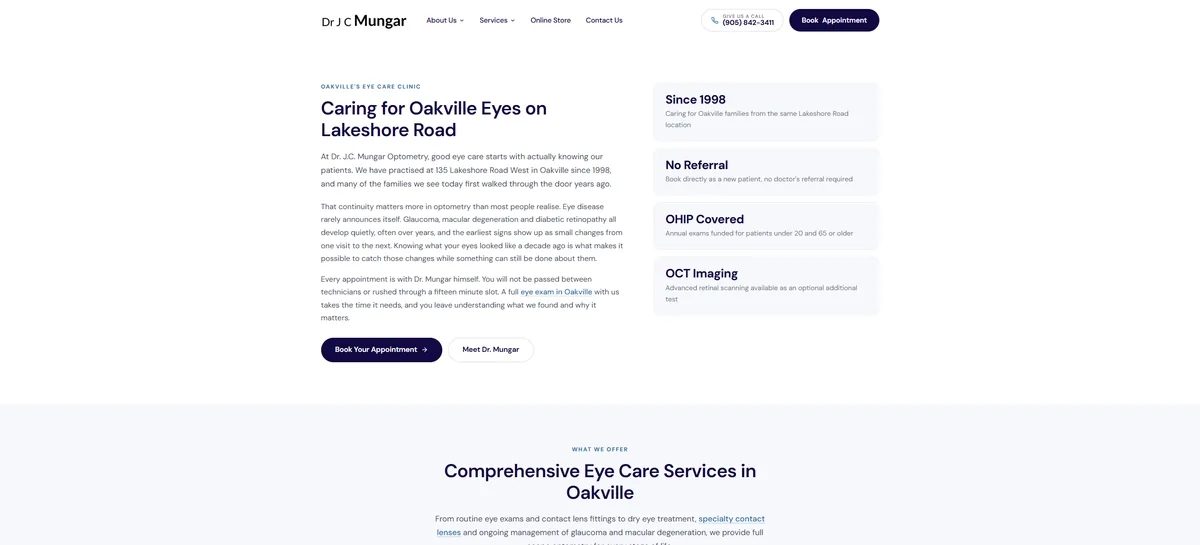
Healthcare · Web + SEO
Dr. J.C. Mungar
An optometry practice on Lakeshore Road since 1998.
Disclosure: Dr. J.C. Mungar's practice is a family connection.
Common questions
Redesigns
Will I lose my Google rankings?
Not if redirects are mapped properly. Every old URL gets a 301 to its new home before launch. Sites usually dip for a couple of weeks while Google reprocesses, then recover and improve.
How do I know if I need a redesign?
Get your free growth plan. Sometimes the answer is a rebuild, sometimes repair, and sometimes the site is fine and the problem is that nothing links to it and there are no pages to rank.
Can you keep my existing content?
Yes, and usually should. Pages already earning traffic get carried across and improved. Throwing out ranking content because it was on the old site is a common and expensive mistake.
How long does a redesign take?
Two to three weeks for most, same as a new build. The audit and redirect mapping add a little at the start, and they are worth it.
Will my site go down during the switch?
No. It gets built alongside the live site and switched over when it is ready.
What if I like how my site looks?
Then we keep the look and fix the structure. Appearance and architecture are separate problems and you are not obliged to change both.
Switching platforms
Do I have to move to WordPress?
If you want us to build or care for your site, yes: we rebuild on WordPress, because you own the files and control the SEO settings. One-off fixes on other platforms can stay as hourly troubleshooting, with no monthly plan. For anything else, get your free growth plan.
Can I move my Wix blog to another platform?
Yes. Blog posts, their images and categories come across. Each old post address is redirected to its new one, so links and rankings carry over. We check moved posts by hand, because formatting rarely transfers perfectly.
Is there a tool that converts a Wix site to WordPress automatically?
Importer tools and plugins can move content, but not your design, apps or layout, because those only exist on Wix. We use tools where they help, then rebuild the site properly on the new platform.
Can you move a Shopify store?
Yes, we can move it onto WordPress with WooCommerce. Builds start from $1,250, and we confirm the exact scope on your free call.
The rest of your marketing, from the same team
Marketing management
Social media, Google and Meta ads, and brand design and content, run for you each month.
Website maintenance
Updates, backups, security and small edits, so the site keeps working.
About maintenanceAI help
Practical AI for one real task at a time, such as an AI receptionist or lead follow-up.
Find out what is holding your site back
On a free 30-minute call, we'll tell you what we'd change first.
Get my free growth plan30 minutes · Video call · Or call (905) 484-0899